

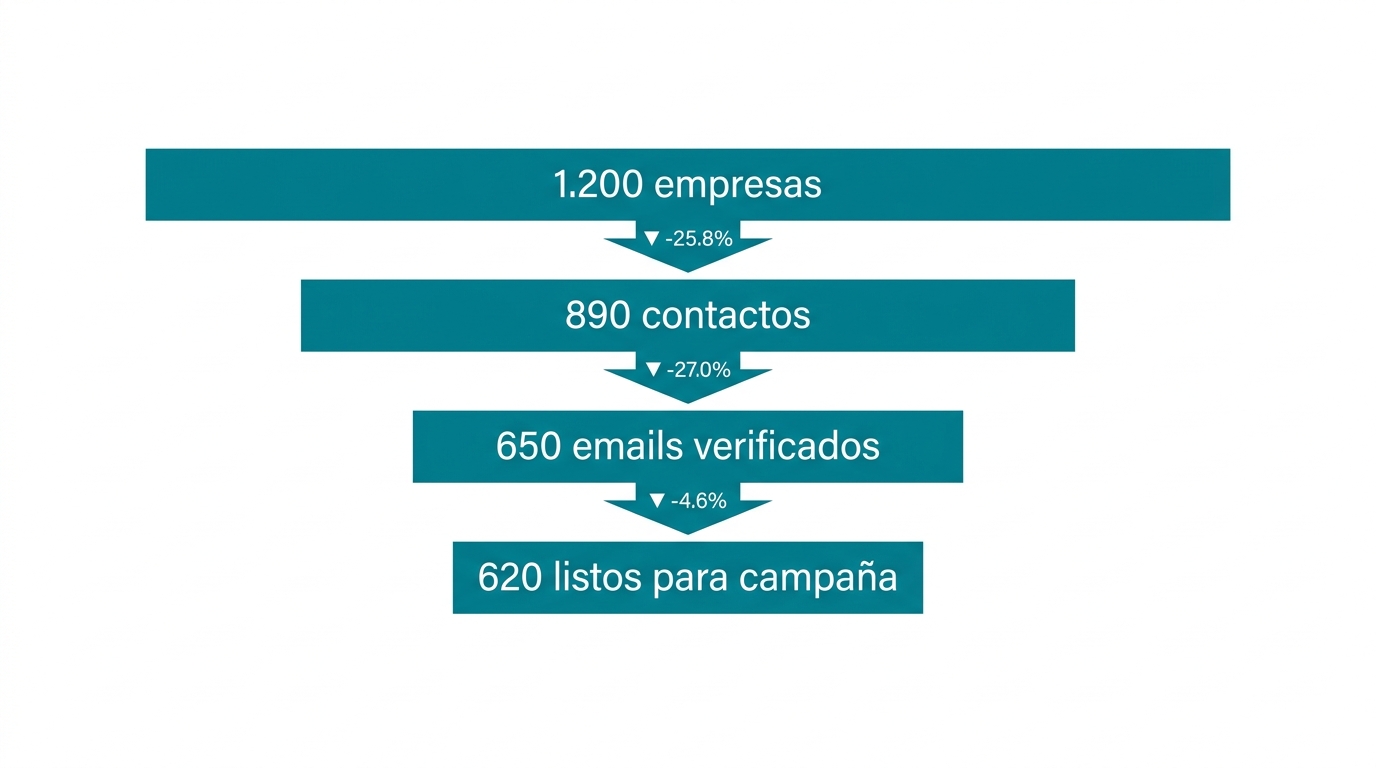
We've spent two years producing cold email campaigns for B2B clients from Seville, Spain. We've sent hundreds of thousands of emails, tested dozens of tools, and broken things we didn't know could break.
The result is a campaign production pipeline built on Claude Code. We published it as open-source because we couldn't find anything like it when we needed it.
This article explains what it is, how it works, and why each phase exists.
Why we open-sourced our pipeline
The short answer: frustration.
When we started using Claude Code to produce campaigns, we looked for existing skills. What we found were basic scripts with no quality controls. You'd feed data to Claude, it would generate copy, and you had to hope it didn't fabricate numbers.
Claude Code without guardrails is dangerous for cold email. It generates phrases nobody would say in person. It invents data that doesn't exist. It doesn't verify that emails are valid before sending. And when you lose context from a window reset, you start from scratch.
We've also found that Claude Code Opus 4.6 ignores your rules about 5% of the time. Doesn't matter how strict you are. This probably doesn't happen with Codex - one of the few things we'll give OpenAI credit for right now.
That's why we built strict rules and multiple verification layers. Not to stop Claude from making mistakes - but to catch them when it does.
Every rule exists because something went wrong. The 98% pass rate requirement before production exists because we once launched a campaign with badly generated variables. We had to pause it two hours in.
The email validation exists because we once loaded 400 contacts without verifying. The bounce rate hit 15% and burned two domains.
We didn't publish this out of generosity. We published it because the current level of public tools for AI-powered campaign production is low. When people send bad cold emails, spam filters get stricter for everyone.
What the produce-campaign pipeline is
It's a Claude Code skill. You install it in your project, type /produce-campaign, and Claude walks you step by step through the 13 phases of campaign production.
It's not a script you run and forget. It's an interactive process where Claude does the heavy lifting - research, variable generation, validation - but you make the important decisions. Which ICP to target, what tone to use, what social proof to include.
Three things make it different from other skills:
Config-first. Everything saves to a per-client configuration file. If Claude loses context, it reads the config and knows exactly where it left off. Which prompts are approved, which lookup tables exist, which campaigns are running.
Gated phases. You can't jump from phase 2 to phase 6. Each phase has a gate that confirms the data is good enough to proceed. If email validation finds a 15% find rate, the pipeline stops and forces you to find alternatives.
Verifiable quality. You don't trust that Claude got the variables right. You review them with a second AI agent that evaluates each lead. If they don't pass 98%, you iterate the prompt and regenerate.
The 13 pipeline phases
The pipeline splits into four blocks: data, production, validation, and launch. Here's each phase with what it does and why it matters.
Data (Phases 0-4)
Phase 0 - TAM creation. Only runs the first time. You define your total addressable market: sectors, company size, geography, target roles. Claude builds the initial company list in Supabase. If your TAM is garbage, everything else will be garbage.
Phase 1 - Session setup. Claude reads the client configuration file. It verifies the data is healthy: no duplicates, no empty fields where there shouldn't be any. It tells you how many companies you have, how many contacts, and how many validated emails. If there are problems, it fixes them before moving forward.
Phase 2 - Contact selection. Each campaign targets a specific decision-maker type - HR director, CEO, operations manager. This phase selects the right contacts from the TAM for the persona you're working on. One contact per company per campaign, always the most senior available.
Phase 3 - Email validation. This is where most manual processes fail. The pipeline runs a multi-provider waterfall to verify each email. If one provider can't find it, the next one tries. If none verify it, that contact doesn't enter the campaign. Deliverability depends on this.
Phase 4 - Data preparation. Automated research on each company: what they do, how many employees they have, what sector they're in. Then name normalization. This phase feeds all the personalization that comes later.
Production (Phases 5-6)
Phase 5 - Campaign infrastructure. Creating the campaign in Smartlead, assigning domains and inboxes, loading sequences. Standardized naming so anyone on the team knows what campaign is what.
Phase 6 - AI-powered variable generation. The heart of the pipeline. Claude generates personalization variables for each contact: observation lines, value bullet points, sector social proof, contextual bridges. This turns a generic template into an email that feels written for that specific person.
This is where quality controls matter most. The pipeline uses a two-stage test loop: first 10 diverse examples to iterate quickly, then 50 to validate at scale. Only when the prompt passes 98% does full production run.
Validation (Phases 7-9)
Phase 7 - Pre-send validation. Spam checking, verification against DNC (Do Not Contact) lists, deduplication across campaigns. Nobody gets the same email from two different campaigns.
Phase 8 - Lead loading. Pushing contacts with all their variables to the sending platform. Verifying every field arrived correctly - not just that the upload didn't error, but that the data looks right on the other end.
Phase 9 - AI quality review. A second agent reviews each lead. It doesn't review variables in isolation - it renders the complete email as the recipient would receive it. It evaluates whether it sounds natural, whether the data is correct, whether the tone is appropriate. If a lead doesn't pass, it gets corrected or excluded.
Launch (Phases 10-12)
Phase 10 - Verification and approval. Final checklist before activating: healthy domains, correct sequences, appropriate sending schedule. This requires human approval. Claude doesn't launch campaigns on its own.
Phase 11 - Post-launch monitoring. The first 48-72 hours are critical. The pipeline monitors bounce rates, open rates, and reply rates. If anything falls outside normal parameters, it alerts immediately.
Phase 12 - Feedback loop. Responses from previous campaigns feed the next ones. Which sectors responded best? Which observation lines generated more replies? Which social proof resonated most? This feedback improves each iteration.
The tools you need
The pipeline uses several external tools. Here's what each one does and whether it's essential.
| Tool | Function | Required? |
|---|---|---|
| Claude Code | Pipeline engine, variable generation, QA | Yes |
| Supabase | Database for companies, contacts, configs | Yes |
| Smartlead | Email sending platform | Yes (or equivalent) |
| GPT-4o-mini | Bulk generation (cheap and fast) | Yes (or equivalent) |
| Claude Haiku | QA and quality reviews | Recommended |
| Prospeo | Email finding and verification | Recommended |
| Serper | Company research (Google API) | Recommended |
| Apollo | Contact and company data | Optional |
| Spam Checker | Sequence spam analysis | Optional |
If you're just getting started, Prospeo is the best all-in-one option for email finding, verification, and enrichment. It covers the functions of several separate tools.
For spam analysis, you can use the free checker at mycoldleads.com. It analyzes your sequences against spam word databases and gives you a score before launch.
Who this is for
If you've never launched a cold email campaign, this pipeline gives you a complete structure to do it right from the start. You won't learn cold email here, but if you already understand the fundamentals and want a real production system, this saves you months of trial and error.
If you already produce campaigns, you probably have your own process. What's interesting here are the quality controls: the two-stage test loop, post-load validation with full rendering, the feedback loop. Almost every agency generates variables with AI and loads them without review. That works until it doesn't.
This isn't for companies sending 50 emails a month by hand. It's for teams producing campaigns with hundreds or thousands of leads who need a process that scales without losing quality.
What makes this pipeline different
I've seen many campaign production processes. Most fail in the same places.
Real quality gates
Generating variables and loading them isn't enough. Each phase has an approval threshold. If the email search returns a 15% find rate, you don't move forward. You search with another provider, check the input data, try another approach.
If variable generation produces 90% quality, you don't launch. You iterate the prompt until you hit 98%. This sounds obvious, but almost nobody does it. The natural tendency is "well, let's work with what we have." That mentality kills campaigns.
Rendered email validation
Most QA processes review variables in isolation. "Does the observation line make sense?" Yes. "Is the bullet point relevant?" Yes. But when you put everything together in the final email, sometimes the result doesn't flow.
Phase 9 renders the complete email and evaluates it as the recipient would read it. That's the difference between copy that sounds natural and copy that sounds like a robot.
The config as persistent memory
Claude Code loses context constantly. If you're mid-production and the window resets, a normal process leaves you stranded.
With the config-first approach, Claude reads the file and knows: "I have 450 companies, 320 with verified email, prompts are approved, campaign P2 is mid-load." You pick up exactly where you left off.
A feedback loop that learns
Phase 12 isn't decoration. Performance data from previous campaigns feeds into the next one. Which sectors responded, which types of observations worked, which CTA generated more meetings. The generation prompt runs on real data, not assumptions.
How to get started
Four steps to get the pipeline running:
1. Clone the repository. You need Claude Code installed. If you don't have it, instructions are in Anthropic's documentation.
2. Copy the skill files. The repository README explains which files go in which folder. There are three: the skill file, the CLAUDE.md with quality rules, and the Supabase schema.
3. Run the schema in your Supabase. This creates the tables for companies, contacts, and configuration. A single SQL operation.
4. Type /produce-campaign in Claude Code. The skill guides you from there. It asks for the client name, reads or creates the config, and starts at the right phase.

Get access to the full repository
Leave your name and email. We'll send you the link and it opens directly.
Frequently Asked Questions
Can you automate cold email with AI end to end?
Partially. AI handles the heavy lifting: researching companies, generating personalized copy, verifying quality. But strategic decisions stay human. You decide which market to target, what tone to use, and when to pause a campaign.
This pipeline automates the repetitive parts and leaves the important decisions in your hands. A fully automated pipeline without human oversight produces mediocre campaigns because it can't adapt to real-time market signals.
What is a cold email pipeline and why does it matter?
A cold email pipeline is the complete process from identifying who you want to contact to the email landing in their inbox. It matters because each step depends on the previous one. If your company list is bad, brilliant copy won't save you.
If you skip email verification, you burn domains. A pipeline structures everything into phases with quality controls so nothing slips through. Without that structure, errors compound and you end up with campaigns that damage your sending reputation.
How do you personalize at scale without sounding robotic?
The key is personalizing based on real data, not generic templates. The pipeline researches each company individually: size, sector, technologies they use. It generates specific observations based on that data.
Then a second AI agent reviews each rendered email to confirm it sounds natural. If it sounds like ChatGPT, it gets rewritten. The test is simple: would you say it at a bar? If not, it doesn't pass.
What if I don't have all the tools in the stack?
The pipeline works with a minimal stack: Claude Code, Supabase, and a sending platform. Enrichment tools like Prospeo, Serper, and Apollo are recommended but replaceable.
If you can only use one data tool, Prospeo covers email finding, verification, and basic enrichment. You can start with that and add tools as your needs grow.
How long does it take to produce a campaign with this pipeline?
Depends on volume. For a 500-lead campaign with one persona, full production takes 3 to 5 hours of active work. That includes prompt iteration and QA. Much of the time is waiting: email verification and bulk generation.
What used to take us two days now gets done in half a day. Quality is higher because the quality controls are automatic.
Does this pipeline work for any sector or just B2B?
It's designed for B2B. The data structure assumes you contact people in their professional role within a company: company, contact, verified email, personalized variables.
If you sell B2C or do email marketing instead of cold email, this pipeline isn't for you. If you do B2B cold email, the sector doesn't matter: software, consulting, financial services, or anything else. The process is the same.